
Overview
Two integration surfaces — HTTP REST for control, WebSocket for real-time event streaming.
komputer.ai is designed from the ground up to be plugged into external systems. The platform itself provides a simple HTTP + WebSocket API that serves as the control plane for AI agents on Kubernetes. Your systems are the ones that create agents, assign tasks, and consume results.
Whether it's a vibecoding platform running coding agents on Kubernetes, a debugging platform that spins up agents to investigate issues in your production environment, or a marketing system that utilizes AI agents to generate and optimize campaigns — komputer.ai is the backend that makes it work.
Architecture
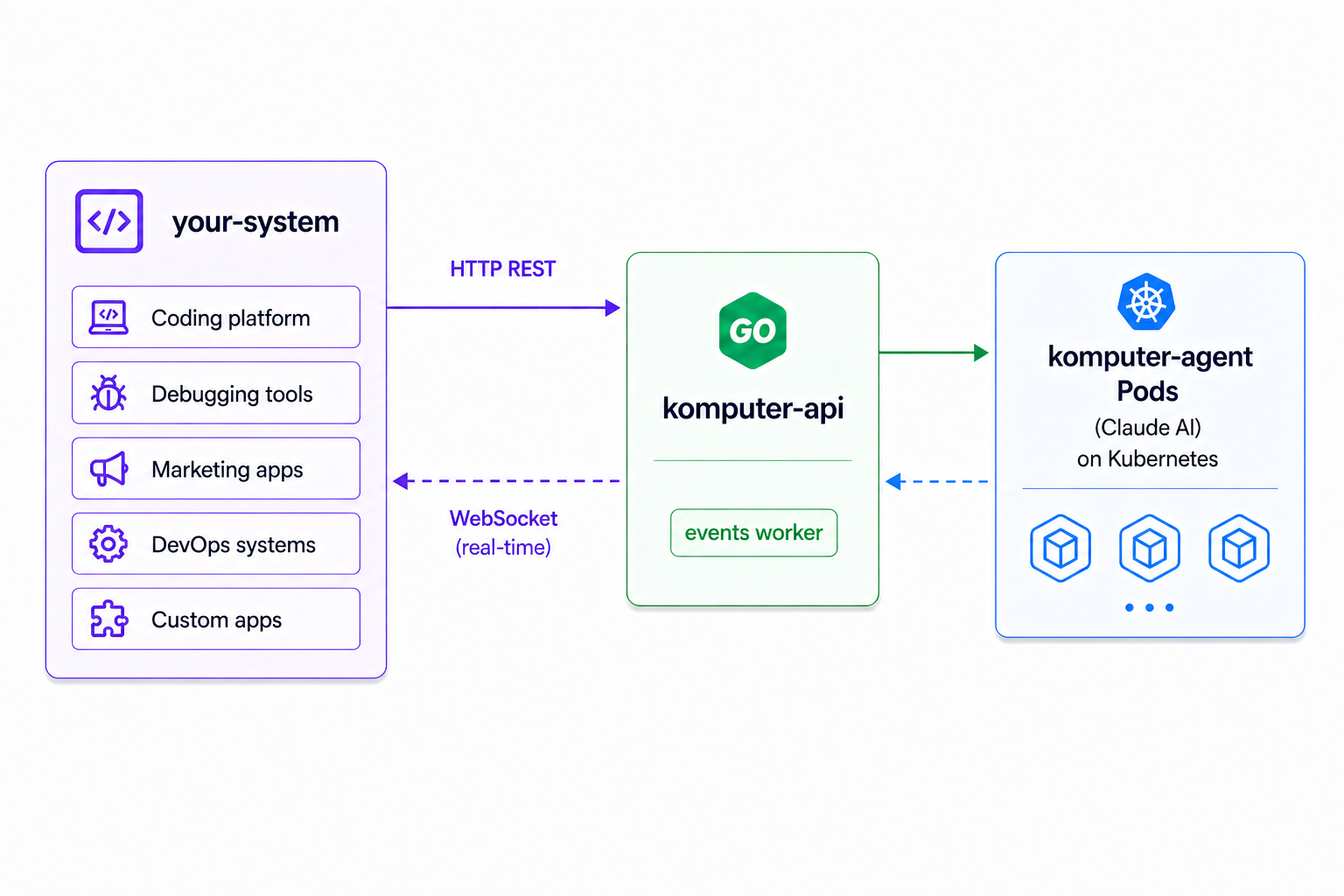
Two integration surfaces:
- HTTP REST — create agents, send tasks, check status, get results, delete agents. See REST API.
- WebSocket — stream real-time events as agents work (thinking, tool calls, text output, completion). See WebSocket events.
Important: komputer.ai is an Internal Backend
komputer.ai is designed to be wrapped by your system, not exposed directly to end users. Think of it as an internal service — like a database or message queue — that your application talks to behind the scenes. This has several important implications:
Your system owns authentication
komputer.ai does not implement authentication or authorization. It is an internal service that should live inside your cluster network, accessible only to your backend systems. Your wrapper application is responsible for authenticating users and deciding who can create agents or access results. Use Kubernetes NetworkPolicies, service mesh, or VPN to ensure komputer-api is not publicly reachable.
Your system owns message persistence
Agent events (thinking, tool calls, text output, task completion) are streamed in real-time via WebSocket and buffered temporarily in Redis. komputer.ai does not provide long-term storage of agent messages. Claude maintains its own internal conversation history for session continuity, but that is not accessible to external systems.
If you need to store agent activity — for audit logs, user-facing chat history, billing, or analytics — your system must collect events from the WebSocket (or the /events endpoint) and persist them in your own database. This is by design: komputer.ai stays simple and stateless, while your wrapper handles the storage strategy that fits your use case.
Your system owns the user experience
komputer.ai ships with a CLI and a web dashboard for direct interaction with the platform, but neither implements authentication. For production use, your wrapper application should handle auth and sit in front of komputer.ai. You can use the built-in UI as an internal operations dashboard, or build your own user-facing interface on top of the API.
Base URL
The komputer-api listens on port 8080 by default. When deployed in-cluster, use the Kubernetes service:
http://komputer-api.<namespace>.svc.cluster.local:8080For local development:
http://localhost:8080Namespace Selection
All endpoints support an optional ?namespace= query parameter. If omitted, the server's default namespace is used. For the create endpoint, namespace can also be passed in the request body.